ChatPPT产品与官网资讯博客站-官方资讯与动态
←Back Home
Get SVIP for Free: A Guide for College Students to Claim 1-Year Membership via Xuexin Verification
ChatPPT产品与官网资讯博客站-官方资讯与动态Article新手入门

Get SVIP for Free: A Guide for College Students to Claim 1-Year Membership via Xuexin Verification

#ChatPPT#College Students#Free SVIP#Membership Guide#Student Verification#SVIP免费领取#Xuexin#高校学生
Published: April 18, 20261 min read431 words60410 views7924 likes
👉方式三:高校学生凭学信网在籍信息进行认证,即可领取1年SVIP领取教程下载【学信网学籍在线验证报告】教程

内容目录

👉方式三:高校学生凭学信网在籍信息进行认证,即可领取1年SVIP领取教程下载【学信网学籍在线验证报告】教程
"
"

College students can get a free 1-year SVIP membership by verifying their enrollment status on Xuexin.com. This guide covers the verification and claiming process.

免费获取SVIP(学生免费领)

👉方式三:高校学生凭学信网在籍信息进行认证,即可领取1年SVIP

领取教程

  1. 登录P端的ChatPPT官网,在首页左上角找到会员专享。

  1. 向右滑动找到学生认证专属SKU,点击进行学生认证。

  1. 上传真实姓名、出生年月日、学信网在籍信息。提交审核后将在1-3个工作日内审核完毕。

  1. 操作步骤无误并审核通过后,进行认证的账号将自动到账1年svip,无需领取等操作

下载【学信网学籍在线验证报告】教程

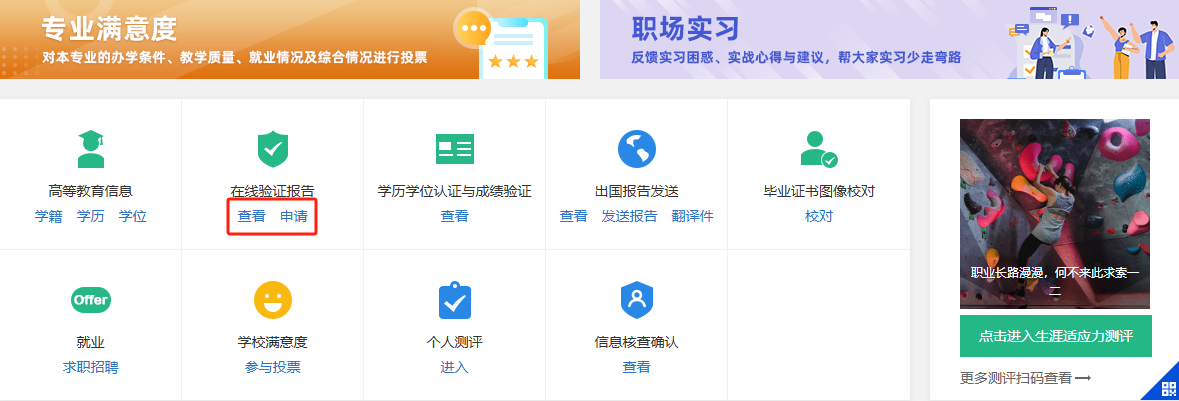
  1. 登录学信网-进入【学信档案】https://my.chsi.com.cn/archive/index.jsp

  2. 点击:查看或申请【在线验证报告】

  1. 点击:查看【教育部学籍在线验证报告】
  1. 若状态为“有效”,可直接点击【查看】; 若状态为“失效”,则点击【延长验证有效期】,有效期成功延长后再进行【查看】

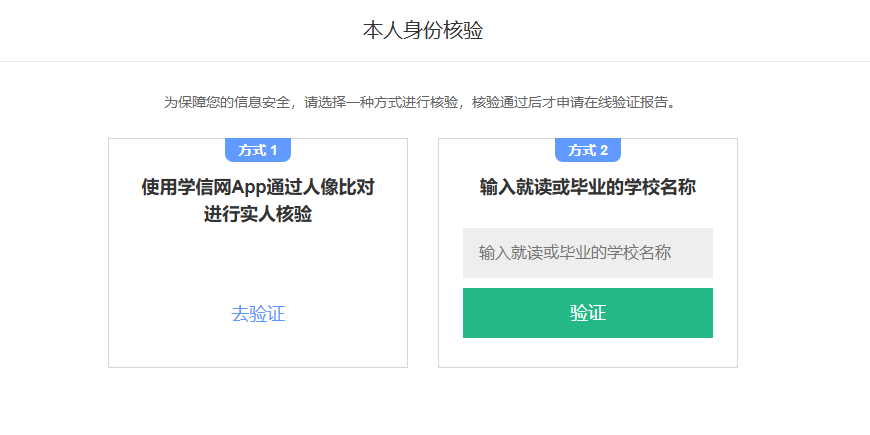
  1. 若需要进行身份验证,可以选择下列任一方式进行(方式二更简单)
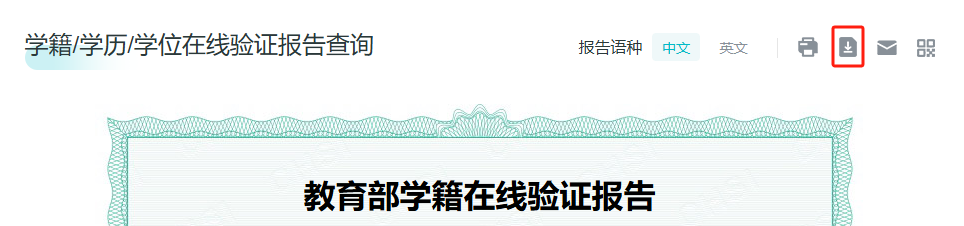
  1. 进入到【教育部学籍在线验证报告】后,点击右上角的下载按钮,下载成功PDF文件。
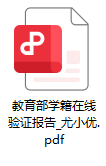
  1. 找到下载好的PDF文件,上传即可
AI Summary

This article provides a step-by-step guide for college students to verify their enrollment via Xuexin.com and claim a free 1-year SVIP membership, including login, submission, review, and automatic activation.

Article Snapshot

Published

April 18, 2026

min read

1

words

431

likes

7924

Continue Exploring

Category Path

新手入门

Open Now→

Parent Category

使用教程

Open Now→

Search Tag

#ChatPPT

Open Now→
高级进阶
7924likes: 7924
Back Home↗

Related Stories

How ChatPPT Reshapes Presentations with AI Speechwriting and Voice Cloning
October 15, 2026
新手入门895 views42 likes

How ChatPPT Reshapes Presentations with AI Speechwriting and Voice Cloning

ChatPPT uses AI speechwriting, voice cloning, and AI roadshows to turn static slides into intelligent digital avatars that can present independently, redefining the next-gen office suite.

Let Slides Speak for Themselves: ChatPPT Reshapes the Full Presentation Workflow with AI Speech Scripts and AI Roadshows
October 14, 2026
新手入门1148 views104 likes

Let Slides Speak for Themselves: ChatPPT Reshapes the Full Presentation Workflow with AI Speech Scripts and AI Roadshows

ChatPPT reshapes the full presentation workflow with AI speech scripts and AI roadshows, turning static slides into intelligent speaking pages through script generation, voice cloning, and AI Q&A with source tracing.

ChatPPT Creative Drawing Mode In-Depth Analysis: How a Dual-Model Engine Turns Presentations into Editable Art Canvases
October 13, 2026
新手入门928 views163 likes

ChatPPT Creative Drawing Mode In-Depth Analysis: How a Dual-Model Engine Turns Presentations into Editable Art Canvases

ChatPPT's Creative Drawing Mode uses the banana pro+2 and gpt-image2 dual-model engine, combined with layer separation and Magic Painting, to turn presentations into editable art canvases.

Try Product
ChatPPT产品与官网资讯博客站-官方资讯与动态

ChatPPT专属资讯与用户文档博客站,第一手的行业动态与讯息,官方站~

Categories

职场干货产品动态使用教程行业洞察

Topics

工具推荐AI办公趋势竞品测评版本发布行业新闻新手入门功能解析高级进阶
HomeAPI Docs访问官网隐私政策服务条款

© 2026 ChatPPT产品与官网资讯博客站-官方资讯与动态. All rights reserved.