
ChatPPT产品与官网资讯博客站-官方资讯与动态
←Back Home
2025 AI PPT Tool Review: ChatPPT Generates Slides and Scripts in One Click, Boosting Workplace Efficiency
ChatPPT产品与官网资讯博客站-官方资讯与动态Article使用教程

2025 AI PPT Tool Review: ChatPPT Generates Slides and Scripts in One Click, Boosting Workplace Efficiency

#AI PPT#AI tools#AI工具#ChatPPT#Gamma#PPT制作#presentation creation#speech generation#workplace efficiency#WPS AI#演讲稿生成#职场效率
Published: April 18, 20263 min read1171 words6814 views937 likes
"
"

This review tests three AI PPT tools, highlighting ChatPPT's ability to create presentations and scripts with voice narration, offering an all-in-one solution for content, slides, and speech delivery.

在快节奏的职场与学习环境中,你是不是也经常觉得做PPT是个“头疼大事”?从内容构思到排版设计,再到动画调试,每一步都让人犯难。好不容易把PPT做出来了,还要熬夜写演讲稿……更可怕的是,上台一紧张就忘词,那种手足无措的感觉,想想都压力山大!

别慌!今天就给大家安利3款超实用的AI工具,不仅能一键生成PPT,连演讲稿都帮你搞定,让你轻松应对答辩、路演等各种场合。

1. ChatPPT:真正“会说话”的智能演示神器

ChatPPT可不只是做PPT那么简单——它真的能“替你讲出来”!

它支持Word、PDF、甚至思维导图等30多种文件导入,只要你上传内容,它就能一键生成结构清晰的演讲稿,更厉害的是,还能用真人级语音朗读帮你把内容“说”出来,甚至还支持声音克隆!试想一下,你上传论文,它不光保留复杂的公式、图表和参考文献,还自动生成答辩提纲和讲解词,连每一页该怎么讲都安排得明明白白。这才是真正的“内容—PPT—演讲”一条龙服务!
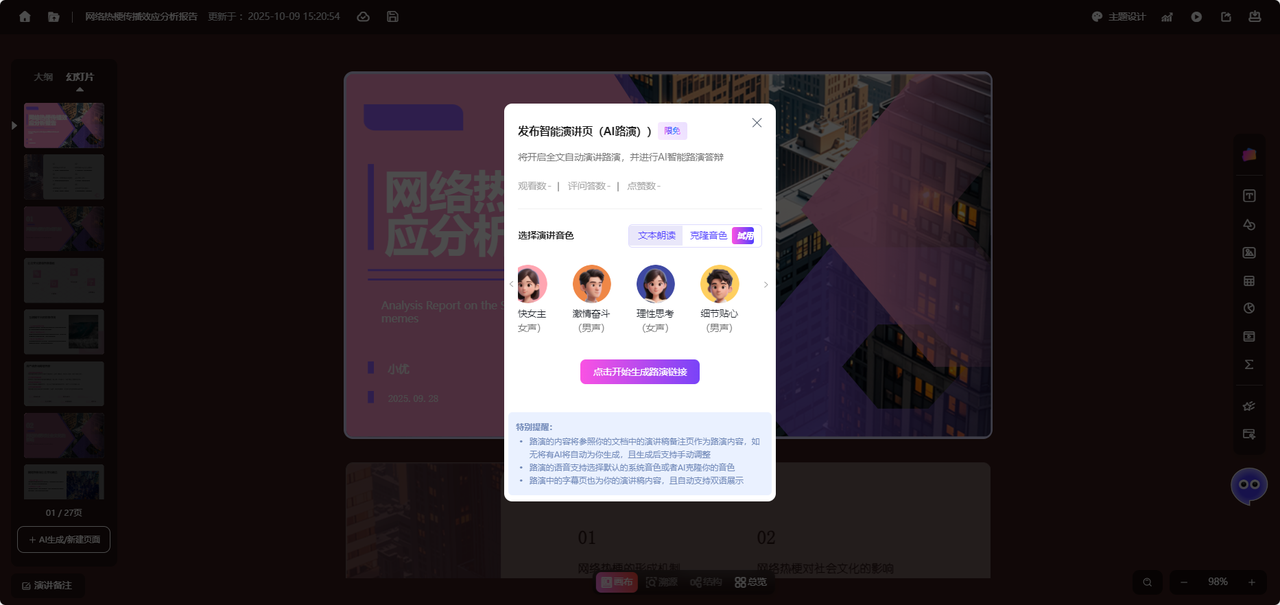
除了基本操作,ChatPPT在专业性和实用性上也妥妥领先。2025年10月发布的V4.11版本中,功能再升级:

  • 专业排版模式 内置超过20种专业模板,涵盖SWOT分析、PEST分析、甘特图、波士顿矩阵等经典模型,支持数据可视化与分析图表智能嵌入。用户上传Excel数据后,系统可自动生成与PPT主题色匹配的动态图表,并对图例位置、数据标签等细节进行优化,极大降低了专业报告的制作门槛。
  • 瀑布流式创作布局 采用“画布式全局视图+路径式动态演示”架构,打破传统PPT线性编辑的局限,支持内容模块自由拖拽与重组。用户还可在页面中嵌入网页链接、互动小游戏(如五子棋、单词拼写)甚至3D文物展示(如乾隆宝碗、兵马俑),显著提升演示的交互性与沉浸感。
  • 场景精准适配 针对不同用户群体提供专属生成模式:学生可使用“论文答辩版”,教师适用“课件PPT模式”,职场人士则可选择“商业财经版”。不同场景下,系统同步生成的演讲稿也会智能调整表达方式、称谓与语气,真正实现内容与场景的高度契合,体现工具的人性化设计理念。

2. WPS AI:办公老搭档,智能新帮手
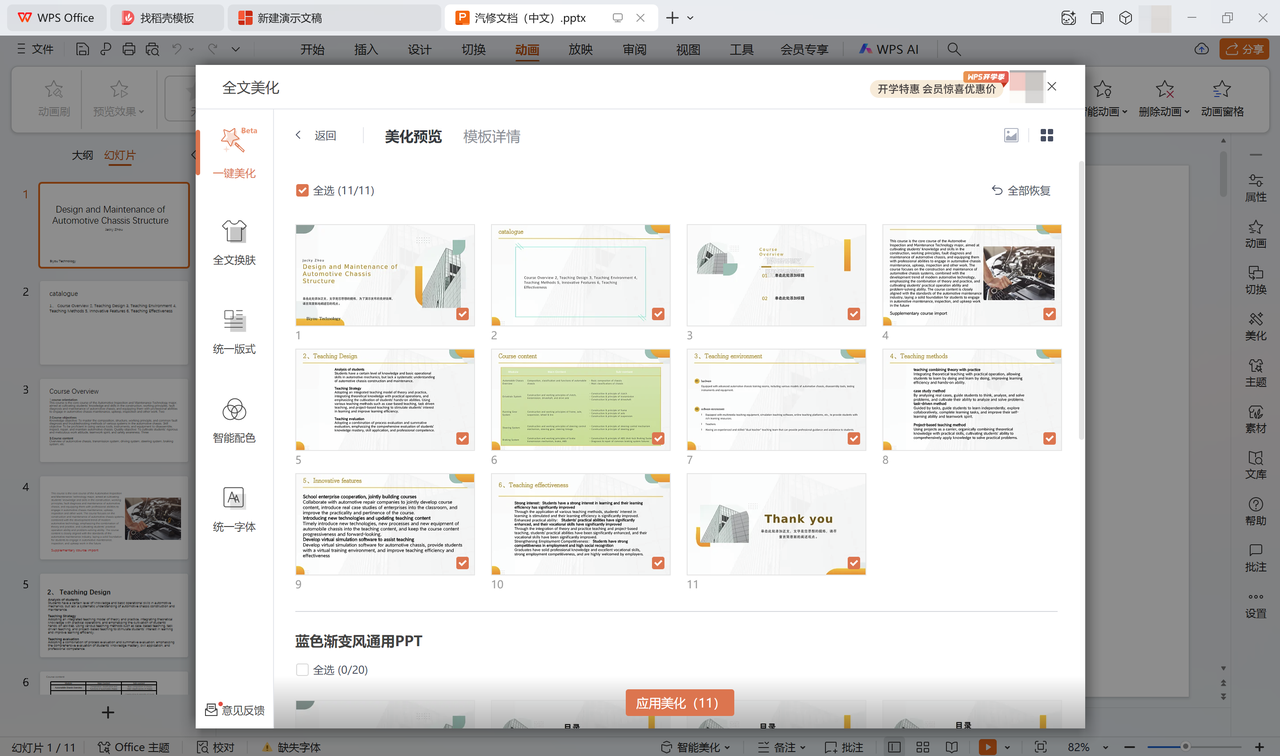
大家对WPS都不陌生,但它的AI功能你试过了吗?输入主题,自动生成大纲与内容,还能帮你扩写、润色台词,自动生成演讲备注。文笔不好也没关系,它连表达建议和灵感都一并提供。

3. Gamma:零基础也能做出高颜值PPT

没有设计功底?没关系!Gamma让你用简单的输入就做出专业级PPT。输入主题,自动生成完整大纲与内容,配好标题、文字、图片和图表,省时又省力。

总结一下

在AI工具的加持下,做PPT和写稿不再是一件苦差事。尤其是ChatPPT,不仅在排版设计和内容生成上表现出色,更在演讲稿生成与真人朗读方面独具优势,真正做到了“让PPT自己会说话”。无论你是要答辩、汇报还是路演,它都能帮你高效准备、自信上台!
AI Summary

This article compares ChatPPT, WPS AI, and Gamma for AI-powered presentation creation, focusing on ChatPPT's professional templates, waterfall layout, and scenario adaptation, plus its unique script generation and voice reading features that streamline workplace presentations.

Article Snapshot

Published

April 18, 2026

min read

3

words

1171

likes

937

Continue Exploring

Category Path

使用教程

Open Now→

Search Tag

#AI PPT

Open Now→
新手入门高级进阶
937likes: 937
Back Home↗

Related Stories

Biyou Technology Recognized as Member of MIIT's AI Application Working Group
May 12, 2026
企业获奖6249 views591 likes

Biyou Technology Recognized as Member of MIIT's AI Application Working Group

Biyou Technology has been officially designated as a member of the AI Application Working Group under the MIIT Industrial Culture Development Center, with its UTalk real-time intelligent document platform receiving AI industry innovation certification.

Quick Start: Experience and Installation Guide
May 12, 2026
新手入门3512 views342 likes

Quick Start: Experience and Installation Guide

This article covers how to quickly experience and install the tool, including online trial and local deployment steps.

In-Depth Review from Product Design & Logic: Why ChatPPT Is the Only 'Complete Product' in the AI PPT Track
May 12, 2026
工具推荐2808 views229 likes

In-Depth Review from Product Design & Logic: Why ChatPPT Is the Only 'Complete Product' in the AI PPT Track

From a product manager's perspective, this review finds ChatPPT the only 'complete product' in AI PPT tools, thanks to its full-chain closed-loop design, semantic understanding, and controllability, earning a 9.8/10 score.

Try Product
ChatPPT产品与官网资讯博客站-官方资讯与动态

Get the latest ChatPPT updates, tutorials, industry insights, and design inspiration. We are reshaping how presentations are created.

Categories

职场干货产品动态使用教程行业洞察

Topics

AI办公趋势竞品测评工具推荐新手入门行业新闻版本发布高级进阶功能解析
HomeAPI Docs访问官网隐私政策服务条款

© 2026 ChatPPT产品与官网资讯博客站-官方资讯与动态. All rights reserved.